Get a US IP address with KlarVPN. Browse through your own encrypted tunnel, protect your connection, and view your session and usage information in a live dashboard.
Private browsing.Protected connection.Privacy you can see.
Need an American IP address without complicated VPN settings?
Choose the USA in KlarVPN and connect through your own encrypted tunnel. Whether you're accessing familiar US websites from abroad, travelling across North America, or using public Wi-Fi, KlarVPN gives you a simple way to browse through a US-based connection.
Connect through the United States so websites using IP-based geolocation can recognise your connection as American. Explore US-focused websites, local news, shopping platforms, and online services that offer country-specific experiences.
Protect Your Connection on Public Wi-Fi
From New York's cafés to Los Angeles hotels, airports, and coworking spaces, shared networks aren't always under your control. KlarVPN encrypts your connection, helping protect your internet traffic when using public Wi-Fi in the USA or abroad.
Stay Connected to American Websites Abroad
Living or travelling outside the United States? A US VPN IP can help you visit familiar American websites, shopping platforms, and everyday online accounts through a US-based connection. Some services may still require additional authentication or location verification.
Keep Your Connection Private Across Borders
Travelling between the USA, Canada, or other international destinations? Keep the USA selected when you need a US IP address, or switch to another KlarVPN location whenever your browsing needs change.
Not a Crowded VPN Pipe
A VPN should do more than display a connected icon.
KlarVPN creates a dedicated, encrypted tunnel for your session, with its own encryption keys, rather than sharing another user's tunnel.
Your tunnel is private to your connection, while the public VPN IP address may still be shared. A dedicated tunnel doesn't mean you're purchasing a dedicated IP.
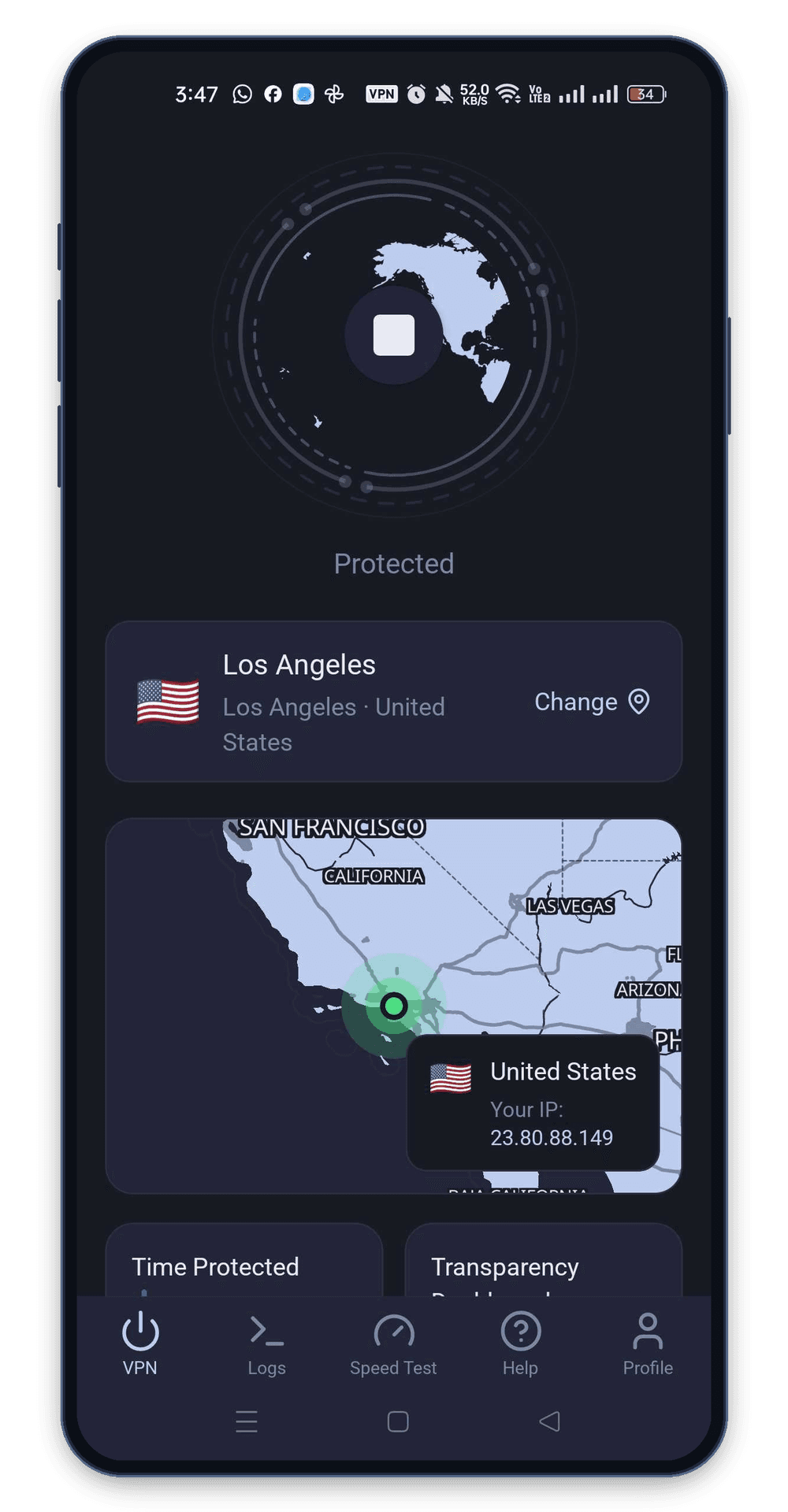
And with the Transparency Dashboard, you can see the session and bandwidth-usage information KlarVPN retains.
Your devicePrivate encryptionUnited States session
One encrypted path for your session.
Built-In KlarVPN Features
Your Own Encrypted Tunnel
An individual encrypted tunnel and session keys for your VPN connection, included with every KlarVPN plan.
Live Transparency Dashboard
See your sessions and bandwidth usage, rather than relying only on a VPN connection indicator.
Refresh Tunnel
Rebuild your VPN tunnel with fresh encryption keys, a refreshed tunnel fingerprint, and a new VPN IP address.
Kill Switch
Help prevent unprotected traffic if your VPN connection unexpectedly drops.
Auto-Connect
Automatically activate VPN protection when joining a network, where supported and enabled in the app.
Get a US IP Address With KlarVPN
Want websites to see an American VPN IP instead of your regular public IP address?
Select the USA in KlarVPN and connect. Your internet traffic travels through an encrypted VPN tunnel and uses the selected USA VPN location's public IP address.
Websites using IP-based geolocation will generally recognise your connection as coming from the United States. However, a VPN doesn't change your physical GPS location, residency status, account country, or device settings.
A US IP address also doesn't guarantee a particular state or city. More precise location results depend on the assigned VPN IP and the geolocation database used by each website.
Encrypted connections with varying tunnel architectures
Your own encrypted tunnel with session-specific keys
Connection status and basic server information
Live Transparency Dashboard with session and usage details
Logging practices explained through privacy policies
No browsing history, DNS queries, or destination IP activity logs
Reconnect or switch servers to refresh connections
Refresh Tunnel with new keys, IP, and fingerprint
Protection features vary by provider and device
Kill Switch + Auto-Connect
Make Your Next Connection a Private One
Whether you're travelling outside the USA, connecting through public Wi-Fi, or looking for an American IP address, KlarVPN gives you a straightforward way to browse with more control.
Choose the USA. Start your tunnel. Browse with more control.
A USA VPN routes your internet connection through a VPN location, providing a US IP address. Websites using IP-based geolocation will generally see the VPN's American public IP instead of your regular network IP.
How can I get a US IP address with KlarVPN?
Download KlarVPN, select the USA from the available VPN locations, and tap Connect. Your connection will use KlarVPN's USA VPN location, giving you a US-based public IP address.
Can I access American websites while travelling abroad?
Yes. You can connect through the USA while travelling, provided KlarVPN is accessible on your current network. Some websites may still apply account verification, regional restrictions, or additional location checks.
Can I choose a specific US state or city with KlarVPN?
KlarVPN currently lists a USA VPN location without advertising individual state or city selections. Your assigned public IP may be recognised as belonging to a particular US city, but this depends on the endpoint and the website's geolocation database.
Can I use a USA VPN to access US banking or government accounts?
A US VPN IP can provide a US-based connection, but it doesn't replace login credentials, identity verification, or multi-factor authentication. Financial institutions and government services may apply additional security checks or restrict VPN access.
Does a USA VPN guarantee access to American streaming services?
No. A USA VPN provides a US IP address, but streaming platforms may apply regional licensing rules, account restrictions, and VPN detection. Access to any specific service isn't guaranteed.
Will a USA VPN automatically show prices in US dollars?
Not necessarily. Some websites use IP-based location to suggest prices in US dollars (USD), but currency, sales tax, and final pricing may also depend on billing details, shipping address, cookies, and account settings.
Does a USA VPN change my state, GPS location, or device time zone?
No. A VPN changes the public IP address websites see. It doesn't change your physical GPS location or automatically adjust your device time zone. Websites may also use other location signals.
Is a dedicated VPN tunnel the same as a dedicated IP?
No. KlarVPN creates an individual encrypted tunnel for your connection, but your public VPN IP address may still be shared with other users.
Does KlarVPN keep browsing activity logs?
According to KlarVPN's published privacy policy, it does not retain browsing history, DNS queries, or destination IP activity logs. It processes the information needed for your account, connection, and usage limits.
Can I use KlarVPN's USA VPN for free?
Yes. The USA and all other KlarVPN locations are available on the Free plan, which includes 3 GB of data every month. You can upgrade to a paid plan if you need more data.