Should You Use a VPN on Public Wi-Fi?
Yes, you should use a VPN on public Wi-Fi whenever you handle personal, work, or financial activity.
Public Wi-Fi is convenient, but it is not always safe. Airports, hotels, cafes, malls, universities, coworking spaces, and public transport hubs usually have shared networks that many people use at the same time. You often do not know who manages the network, how secure it is, or whether the network name is even real.
A VPN helps protect your connection by creating an encrypted tunnel between your device and the VPN service. This makes it harder for people on the same public network to monitor your activity at the network level.
A VPN does not make public Wi-Fi risk-free. It does not protect you from phishing, weak passwords, malware, fake websites, or an already compromised device. But it is one of the simplest protections you can turn on before using a network you do not fully control.
The simple answer is:
Use a VPN on public Wi-Fi before you browse, log in, shop, work, or bank online.
Why Public Wi-Fi Can Be Risky
Public Wi-Fi is risky because it is open, shared, and often difficult to verify.
At home, you usually know who controls the network. On public Wi-Fi, you usually do not. The network may belong to a cafe, airport, hotel, mall, or coworking space, but you cannot always see how it is configured or who else is connected.
That creates a few common risks.
Open Networks
Some public Wi-Fi networks do not require a password. Anyone nearby can join them.
That does not mean everyone on the network is dangerous, but it does mean the network is shared with strangers. If you are checking email, logging into accounts, or opening work tools, you should not depend only on the network being safe.
A public Wi-Fi VPN adds a layer of protection before your traffic leaves your device.
Fake Hotspots
Fake hotspots are Wi-Fi networks created to look like real ones.
For example, you may see names like:
- Airport Free Wi-Fi
- Hotel Guest Wi-Fi
- Cafe Wi-Fi
The problem is that fake networks can use names that look almost identical to real ones. If you connect without checking, you may join a network controlled by someone else.
Before connecting, always confirm the official network name with staff or signage.
Traffic Interception
On unsafe public networks, attackers may try to monitor or interfere with traffic moving across the network. A VPN helps by encrypting your connection, so your activity is harder to inspect at the Wi-Fi network level.
This matters most when you are using email, work apps, banking apps, shopping sites, messaging tools, or anything linked to your identity.
Weak Router Security
Some public Wi-Fi networks are not maintained properly.
The router may be outdated. The settings may be weak. The network may be overloaded. The business offering the Wi-Fi may not have strong security practices.
As a user, you usually cannot check any of this before joining. That is why it is better to protect your own connection instead of trusting the network.
Shared Networks
Public Wi-Fi is shared by nature.
You may be on the same network as travellers, customers, students, staff, and strangers nearby. That does not automatically mean something bad will happen, but it does mean you should treat the network carefully.
Use public Wi-Fi for convenience, not blind trust.
For a deeper explanation of this risk, read Does a VPN Protect You on Public Wi-Fi?
What a VPN Helps Protect on Public Wi-Fi
A VPN protects the connection between your device and the VPN tunnel.
In simple terms, it helps stop people on the same public network from easily seeing or interfering with your internet activity at the network level.
Here is what a VPN helps with.
It Encrypts Your Connection
When your VPN is turned on, your internet traffic travels through an encrypted tunnel.
That means someone on the same public Wi-Fi network cannot easily inspect your traffic in the same way they might on an unprotected connection.
This is the main reason to use a VPN on public Wi-Fi.
It Helps Hide Your Real IP Address
Your IP address can reveal information about your approximate location and internet provider.
When you use a VPN, websites usually see the VPN connection instead of your real IP address.
This does not make you fully anonymous online, but it does reduce direct exposure of your real IP address while browsing.
It Reduces Network-Level Snooping
A Wi-Fi owner or someone abusing the network may be able to see some network-level activity when you browse without protection.
A VPN helps reduce that visibility by encrypting your connection.
This is especially useful when you are using public Wi-Fi at airports, hotels, cafes, universities, malls, and coworking spaces.
It Protects Before You Start Browsing
The best time to turn on a VPN is before you open websites or apps.
Do not wait until after you log into your email, check your bank account, or open work tools.
On public Wi-Fi, the safer habit is:
Connect to Wi-Fi.
Turn on your VPN.
Then browse.
What a VPN Does Not Fix
A VPN is useful, but it does not solve every online safety problem.
No honest VPN should claim to protect you from everything.
Here is what a VPN does not fix.
Phishing
A VPN cannot stop you from entering your password on a fake website.
If a fake login page looks real and you type your details into it, a VPN cannot protect you from that mistake.
Always check the website address before logging in.
Weak Passwords
A VPN does not protect weak or reused passwords.
If someone already has your password, a VPN will not stop them from logging into your account.
Use strong passwords and enable two-factor authentication when possible.
Malware
A VPN does not remove malware from your device.
If your phone or laptop is already infected, a VPN cannot make the device safe again.
Keep your device updated and avoid downloading unknown files.
Fake Websites
A VPN protects your connection, but it does not guarantee that every website you visit is safe.
You still need to avoid suspicious links, fake login pages, and unknown payment pages.
Already Compromised Devices
If your device is already compromised, a VPN cannot fully protect your personal data.
Public Wi-Fi safety works best when your device is updated, your accounts are secure, and your VPN is turned on before browsing.
When a VPN Matters Most on Public Wi-Fi
A VPN matters most when the network is public, shared, or outside your control.
Here are the places where you should be extra careful.
Airports
Airport Wi-Fi is one of the clearest cases for using a VPN.
Many people connect to airport networks every day, and travellers often use them for email, banking, booking, work, and messaging.
Before connecting at an airport, turn on your VPN and confirm the official network name. You may also want to read Is Airport Wi-Fi Safe? before using airport networks for anything sensitive.
Hotels
Hotel Wi-Fi can feel safer because you are staying there, but it is still a shared network.
Other guests, staff, and visitors may be connected. Some hotel routers may also be outdated or poorly configured.
Use a hotel Wi-Fi VPN before logging into accounts, opening work tools, shopping, or checking financial information.
Cafes
Cafe Wi-Fi is common for remote work, study, and casual browsing.
If you are only reading general websites, the risk may be lower. But if you are logging into accounts, using work tools, or making payments, use a VPN first.
Coworking Spaces
Coworking spaces may have better networks than random public Wi-Fi, but they are still shared environments.
If you work with client data, company dashboards, private files, or admin tools, use a VPN.
Universities
University networks can have many users and devices connected at the same time.
Students, visitors, staff, and shared devices may all be using the network. A VPN adds protection when you are browsing, studying, or logging into accounts.
Malls and Public Transport Hubs
Mall Wi-Fi, train station Wi-Fi, and bus terminal Wi-Fi are built for convenience, not deep privacy.
Use them carefully. Turn on your VPN before opening personal accounts or payment pages.
Public Wi-Fi Safety Checklist
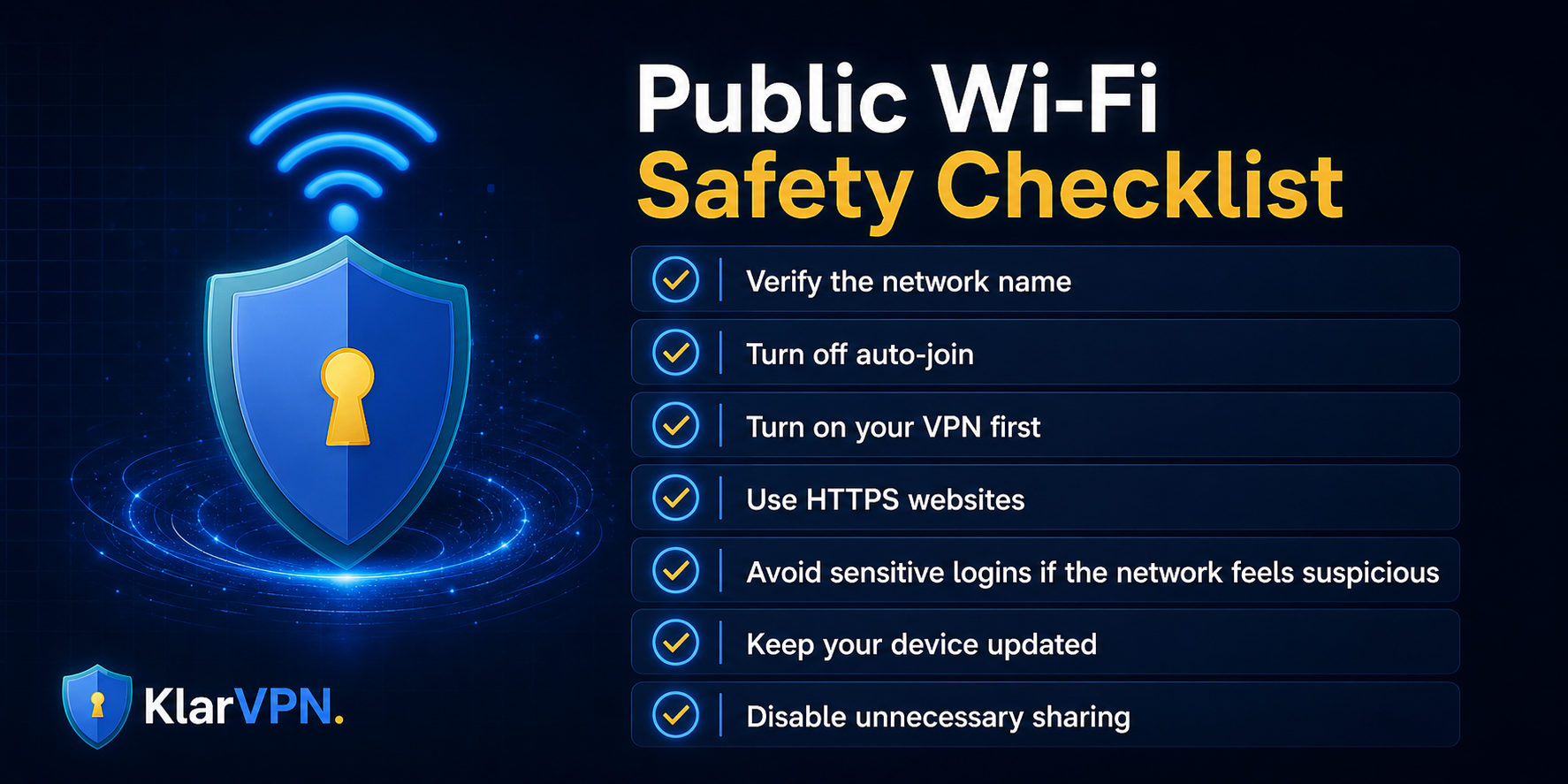
Use this checklist before browsing on public Wi-Fi.
1. Verify the Network Name
Do not connect to the first network that looks official.
Ask staff for the correct Wi-Fi name at hotels, cafes, airports, and coworking spaces.
Fake hotspots often use names that look real.
2. Turn Off Auto-Join
Auto-join can make your device connect to public networks automatically.
Turn it off for public networks so your phone or laptop does not reconnect later without your permission.
3. Turn On Your VPN First
Enable your VPN before opening websites, email, banking apps, shopping pages, or work tools.
This is the most important habit.
4. Use HTTPS Websites
Check that websites use HTTPS before entering passwords or payment details.
A VPN helps protect your connection, but you should still avoid unsafe websites.
5. Avoid Sensitive Logins if the Network Feels Suspicious
If the network name looks strange, the login page feels fake, or the connection behaves oddly, avoid sensitive activity.
Use mobile data instead if possible.
For financial activity, read Should You Use a VPN for Online Banking?
6. Keep Your Device Updated
Update your operating system, browser, and apps.
Security updates help protect your device from known issues.
7. Disable Unnecessary Sharing
Turn off file sharing, public folders, and unnecessary device discovery when using shared networks.
This reduces exposure to public Wi-Fi.
How KlarVPN Helps on Public Wi-Fi
KlarVPN is built for people who want privacy they can understand.
On public Wi-Fi, KlarVPN helps by protecting your connection through your own private, encrypted tunnel. Instead of browsing directly on a network you do not fully control, KlarVPN helps create a safer path for your traffic before it reaches websites and apps.
KlarVPN also focuses on visible privacy.
With the live transparency dashboard, users can better understand what exists in KlarVPN's system and what does not. That matters because VPN privacy should not be only a trust us claim.
For public Wi-Fi users, Kill Switch and Auto-Connect are especially useful.
Auto-Connect helps activate KlarVPN when you join a network, so you do not forget to turn your VPN on.
Kill Switch helps block internet traffic if your VPN connection drops, reducing the risk of accidental exposure.
If you often use airports, hotels, cafes, malls, universities, or coworking spaces, KlarVPN gives you a simpler way to protect your connection before you browse.
So, Should You Use a VPN on Public Wi-Fi?
Yes.
You should use a VPN on public Wi-Fi whenever you are doing anything personal, financial, work-related, or account-based.
A VPN helps protect your connection, hides your real IP address from websites, and reduces network-level snooping on shared Wi-Fi.
But a VPN is only one part of public Wi-Fi safety.
You should still verify the network name, use HTTPS websites, avoid suspicious links, keep your device updated, and use strong passwords.
The best habit is simple:
Before using public Wi-Fi, turn on a trusted VPN.
Try
free before connecting to public Wi-Fi and browse with your own private, encrypted tunnel instead of relying on an unprotected open network.
FAQs
Is public Wi-Fi safe if the network has a password?
A password makes public Wi-Fi slightly more controlled, but it does not guarantee safety. Many people may still share the same password. You should still use a VPN when handling personal, work, or financial activity.
Should I use a VPN at a hotel?
Yes. Hotel Wi-Fi is still a shared network. Other guests and devices may be connected to the same network, and you usually do not know how secure the router is. Use a VPN before browsing, working, shopping, or logging into accounts.
Can the Wi-Fi owner see what I do if I use a VPN?
A VPN helps prevent the Wi-Fi owner from seeing your browsing activity inside the encrypted VPN tunnel. They may still see that your device is connected to the network and using VPN traffic, but they should not see your activity in the same direct way.
Is mobile data safer than public Wi-Fi?
In many cases, mobile data is safer than unknown public Wi-Fi because you are not joining a shared local network. A VPN can still be useful on mobile data for IP privacy and safer browsing.
Should I keep my VPN on all the time?
If you regularly use public Wi-Fi or want more consistent privacy, keeping your VPN on is a good habit. At minimum, turn it on before using public networks, logging into accounts, shopping, banking, or working remotely.


