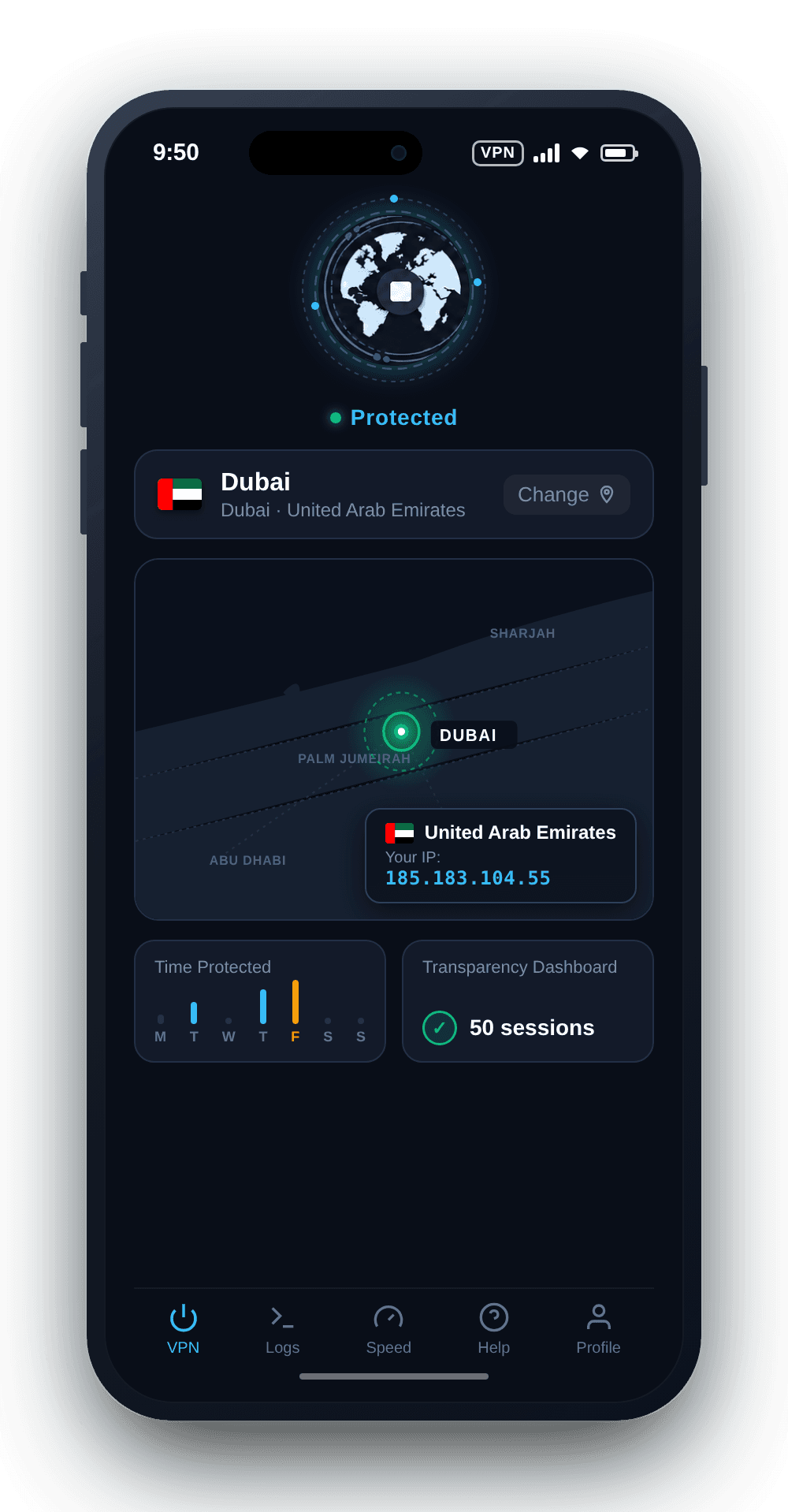
Get a UAE IP address with KlarVPN. Choose Dubai, browse through your own encrypted tunnel, and view your session and usage information in a live dashboard.
Private browsing.Protected connection.Privacy you can see.
Looking for a UAE IP address without complicated VPN settings?
Choose Dubai in KlarVPN and connect through your own encrypted tunnel. Whether you're travelling abroad, visiting UAE-focused websites, or protecting your connection on shared networks, KlarVPN gives you a straightforward way to manage your VPN connection.
Connect through KlarVPN's Dubai location so websites using IP-based geolocation can recognise your connection as coming from the United Arab Emirates. Useful for browsing UAE-focused websites, exploring local information, and viewing region-relevant online content.
Protect Your Connection on Public Wi-Fi
From Dubai International Airport to hotels, cafés, and coworking spaces, shared networks aren't always under your control. KlarVPN encrypts your connection, helping protect your internet traffic when using public Wi-Fi, wherever the service is available.
Stay Connected to Familiar UAE Websites
Travelling or living outside the UAE? A UAE VPN IP can be useful when visiting familiar websites, news platforms, and everyday online accounts. Keep in mind that some services have additional identity checks, regional restrictions, or VPN policies.
Manage Your Connection While Travelling
Moving between Dubai and other international destinations? Select the VPN location that suits your needs and manage your encrypted connection from KlarVPN. Network availability and local rules can vary by country.
Not a Crowded VPN Pipe
A VPN should do more than display a connected icon.
KlarVPN creates a dedicated encrypted tunnel for your session, with its own encryption keys rather than another user's tunnel.
Your tunnel is private to your connection, while the public VPN IP address may still be shared. A dedicated tunnel doesn't mean you're purchasing a dedicated IP.
And with the Transparency Dashboard, you can see the session and bandwidth-usage information KlarVPN retains.
An individual encrypted tunnel and session keys for your VPN connection, included with every KlarVPN plan.
Live Transparency Dashboard
See your sessions and bandwidth usage, rather than relying only on a VPN connection indicator.
Refresh Tunnel
Rebuild your VPN tunnel with fresh encryption keys, a refreshed tunnel fingerprint, and a new VPN IP address.
Kill Switch
Help prevent unprotected traffic if your VPN connection unexpectedly drops.
Auto-Connect
Automatically activate VPN protection when joining a network, where supported and enabled in the app.
Get a UAE IP Address With KlarVPN
Want websites to see a UAE VPN IP address instead of your regular public IP?
Select Dubai in KlarVPN and connect. Your internet traffic travels through an encrypted VPN tunnel and exits through the selected UAE location.
Websites using IP-based geolocation will generally recognise your connection as being from the UAE. However, a VPN doesn't change your physical GPS location, residency status, billing address, or account-country settings.
Encrypted connections with varying tunnel architectures
Your own encrypted tunnel with session-specific keys
Connection status and basic server information
Live Transparency Dashboard with session and usage details
Logging practices explained through privacy policies
No browsing history, DNS queries, or destination IP activity logs
Reconnect or switch servers to refresh connections
Refresh Tunnel with new keys, IP, and fingerprint
Protection features vary by provider and device
Kill Switch + Auto-Connect
Make Your Next Connection a Private One
Whether you're travelling abroad, using shared Wi-Fi, or looking for a UAE IP address, KlarVPN gives you a straightforward way to browse with more control.
Choose Dubai. Start your tunnel. Browse with more control.
A Dubai VPN lets you connect through a VPN location associated with Dubai. KlarVPN's Dubai location provides a UAE VPN IP address, allowing websites to see the VPN's public IP instead of your regular network IP.
How can I get a UAE IP address with KlarVPN?
Download KlarVPN, select Dubai from the available VPN locations, and tap Connect. Your internet traffic will be routed through the selected UAE VPN location, giving you a UAE-based public IP address.
Is a UAE IP address the same as a Dubai IP address?
Not always. Dubai is a city within the United Arab Emirates. A UAE IP address can identify your connection as being from the country, but city-level geolocation depends on the assigned IP address and the geolocation database used by the website.
Can I use KlarVPN while travelling in Dubai?
VPN availability can depend on the local network, internet service provider, and applicable regulations. KlarVPN doesn't guarantee connectivity on every network. Always follow the laws and network policies that apply where you're using the service.
Is using a VPN legal in Dubai?
UAE regulations permit certain legitimate VPN uses, including businesses accessing internal networks. However, using VPN services to circumvent required internet filtering or engage in prohibited activities can violate local rules. Consult current UAE Telecommunications and Digital Government Regulatory Authority (TDRA) guidance before relying on a VPN in the country.
Can I use a Dubai VPN to access UAE websites from abroad?
A UAE VPN IP can help websites recognise your connection as UAE-based. However, some services also apply account verification, residency requirements, or geographic restrictions. A VPN doesn't guarantee access or replace those requirements.
Is a dedicated VPN tunnel the same as a dedicated IP?
No. KlarVPN creates an individual encrypted tunnel for your connection, but your public VPN IP address may still be shared with other users.
Does KlarVPN keep browsing activity logs?
According to KlarVPN's published privacy policy, it does not retain browsing history, DNS queries, or destination IP activity logs. It processes the information needed for your account, connection, and usage limits.
Can I use KlarVPN's Dubai VPN for free?
Yes. Dubai and all other KlarVPN locations are available on the Free plan, which includes 3 GB of data every month. You can upgrade to a paid plan if you need more data.